

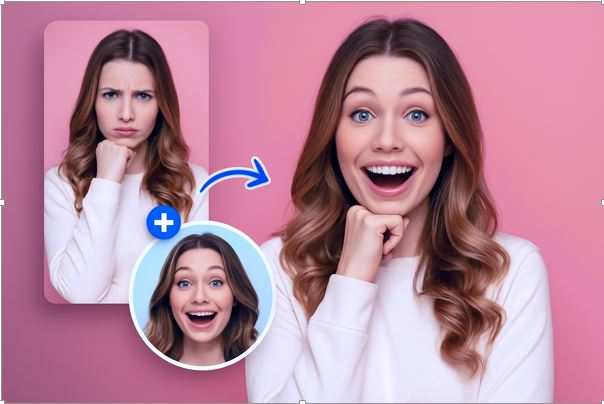
Have you ever looked at a group photo and thought, “What if we could swap everyone’s faces around?” Or maybe you’ve watched a movie scene and imagined yourself in it. These little “what ifs” used to require expensive software and hours of editing. Now, thanks to AI, it takes about ten seconds, and it’s free.
This tool is one of those discoveries that makes you wonder why you ever struggled with anything else. It’s clean, it’s fast, and it actually does what it promises. No surprise charges, no blurry results, no watermarks ruining your final image. Just a genuinely good face swap experience that works whether you’re a content creator, a business owner, or someone who just wants to make their friends laugh.
Why People Are Obsessed with Face Swapping
Face swapping isn’t just a party trick anymore. It’s become a legitimate creative tool. Businesses drop faces onto model bodies to save money on photoshoots. YouTubers and TikTokers use it to make entertaining content without a big production budget. Teachers have used it to bring historical figures to life. And the rest of us? We use it to make memes, mess with old photos, and generally have a good time.
The technology behind it has come a long way. Early face swaps looked obviously fake, mismatched skin tones, awkward edges, lighting that made no sense. The good tools today actually account for all of that. The AI reads the original photo’s lighting, texture, and geometry and blends the new face in as if it had always been there. The difference between a cheap face swap and a quality one is immediately obvious, and once you see what a well-built tool can do, there’s no going back.
The Free Face Swap Tool That Does It All
The free face swap tool works for both photos and videos. You upload your original image or clip, upload the face you want to swap in, hit the button, and you’re done. It supports all the common formats: JPG, PNG, WEBP for photos, and MP4, MOV, GIF, and more for video. There’s nothing to download and nothing to sign up for just to try it.
What stands out most is how natural the results look. It’s not just slapping a face onto a body. The tool matches skin tone, adjusts for lighting angles, and respects the original expression so the final result actually looks believable. You can use it on your phone, your laptop, your tablet. It works anywhere you have a browser and an internet connection.
When One Face Isn’t Enough
Group photos are where things get really fun. The multiple face swap tool lets you replace every face in a photo or video at once. The AI automatically detects each face individually, and you assign a replacement for each one. It handles tricky situations too side angles, dim lighting, partially hidden faces without you having to do any manual adjustments.
Think about the possibilities: putting your whole friend group into a movie poster, recreating a famous painting with your family’s faces, or making a personalized meme with your coworkers. It’s the kind of thing that takes thirty seconds and makes someone’s day.
Face Swapping in Videos, Done Right
Swapping faces in videos is a whole different challenge compared to photos. Every single frame has to be processed, and the face has to stay consistent as the person moves, turns, or changes expression. A lot of tools fall apart here: flickering faces, misaligned edges, expressions that don’t match the movement. It’s jarring, and it ruins the whole effect.
The multiple face swap video feature tracks multiple faces throughout an entire video clip smoothly, without flickering or misalignment between frames. The AI keeps up with movement and expression changes, so the final video looks fluid and natural. You can download the result in up to 1080p with no watermark, ready to post or share immediately.
Just Give It a Try
There’s no reason to overthink it. The tool is free, it works, and the results are genuinely impressive. Whether you want to swap a single face in a photo or replace an entire cast in a video clip, everything you need is right there. Upload, swap, download, done. It really is that straightforward, and once you try it, you’ll find yourself coming back to it again and again.
Conclusion
Face swapping has evolved from a fun gimmick into a powerful AI-driven creative tool. What once required complex editing skills can now be done in seconds with a simple, free online tool. Whether you’re editing a single portrait or transforming an entire group photo or video, modern AI makes the process fast, realistic, and accessible to everyone. With no watermarks, no signups, and support for both images and videos, this tool opens up endless creative possibilities for entertainment, content creation, and personal use.
FAQs
What is a face swap tool?
A face swap tool is an AI-powered application that replaces one face with another in photos or videos while keeping expressions, lighting, and angles realistic.
Is the face swap tool free to use?
Yes, the tool is completely free to use with no hidden charges, sign-up requirements, or watermarks.
Can I swap multiple faces in one photo?
Yes, you can swap multiple faces at once in group photos. The AI automatically detects and processes each face individually.
Does it work for videos as well?
Yes, the tool supports video face swapping with smooth frame tracking for natural and realistic results.
Do I need to install any software?
No, everything works directly in your browser. No downloads or installations are required.
What file formats are supported?
It supports common formats like JPG, PNG, WEBP for images and MP4, MOV, GIF for videos.
Will the final result look natural?
Yes, the AI adjusts lighting, skin tone, and facial expressions to ensure realistic and high-quality results.

